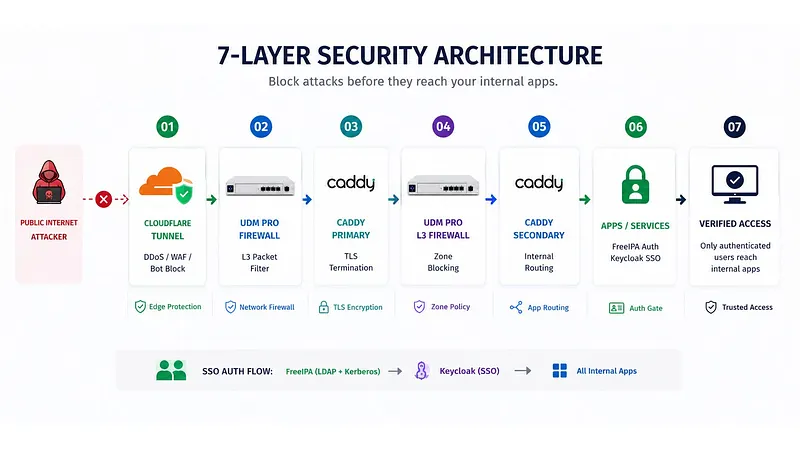
Turn on Intrusion Prevention (IPS) on your UniFi network and you get powerful, real-time protection — it blocks outside attacks and stops inside infections the moment they happen.
1 in 5 small businesses cannot survive a network break-in that costs as little as $10,000. The average SMB doesn't have a firewall — it has a router with default settings.
The SMB Security Reality
Small businesses are far more often targeted by network intrusions exactly because their defenses are weaker than large targets. A tenant with a flat network, default firewall rules, and no Intrusion Prevention is a low-effort target. The VikingCloud 2025 SMB Threat Landscape Report found that 1 in 5 SMBs cannot survive a break-in costing $10,000 — and the average break-in costs far more.
UniFi Security Stack
What UniFi's Built-In Security Features Actually Do
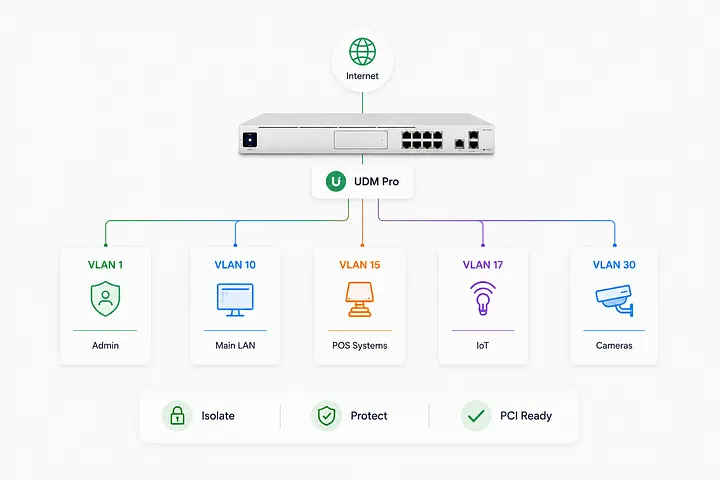
01 / Firewall: UDM Pro includes a stateful firewall. Properly set up inter-VLAN rules block unauthorized traffic between Network Devices (computers, Wi-Fi, cameras, and other smart devices), guest, and staff networks. Default installation does not enable these rules — setup is needed.
02 / Intrusion Prevention: UniFi's Threat Management (powered by Suricata) scans traffic for known attack signatures. IDS alerts on suspicious patterns; IPS blocks them. Needs a UDM Pro or UDM SE — not available on basic routers.
03 / DNS Filter: UniFi's built-in DNS filtering blocks known harmful domains, phishing sites, and C2 (command-and-control) servers. Applied per-VLAN — stricter rules on guest networks, lighter rules on internal staff networks.
04 / Watching: UniFi's dashboard logs traffic by device, VLAN, and application. Anomaly alerts notify on unusual upload volumes, new devices on protected VLANs, and blocked intrusion attempts — in real time.
🛡️ PCI DSS Requirement 11: Intrusion Spotting PCI DSS Requirement 11 mandates that merchants test security systems and processes regularly — including intrusion spotting. UniFi's Intrusion Prevention, when properly set up, satisfies this requirement with logged, reviewable threat data. A tenant running a flat network with no Intrusion Prevention fails this requirement and is exposed to both card data theft and PCI audit findings.
Setup vs. Default
Why Default UniFi Settings Are Not Secure
- Intrusion Prevention is off by default — You must manually enable Threat Management in the UDM Pro settings. Most installations never do. Enable it in: Settings → Security → Threat Management.
- Inter-VLAN routing is allowed by default — Without explicit firewall rules, devices on your guest VLAN can reach your Network Devices VLAN. This is a PCI violation and a security gap.
- DNS filtering needs manual VLAN assignment — Threat filtering applied to the wrong VLAN provides no protection where it matters. Network Devices VLAN DNS filtering should be the strictest setup.
- Alert routing must be set up — UniFi can email or push-notify on blocked threats and new device detections. Without set up alerts, threats are logged but no one sees them.
- Regular rule audits are needed — Firewall rules accumulate over time. Rules added for temporary purposes and never removed create unintended gaps. Review quarterly.
MKR Systems Approach
Related Reading
MKR Systems is an authorized AT&T Business agent. All analysis, recommendations, and cost models in this article are independently produced by MKR Systems based on publicly available data and our direct operational experience. Third-party data sources are cited as listed above. MKR Systems is not affiliated with, endorsed by, or acting on behalf of Ubiquiti, 3CX, or any other vendor mentioned herein for the purposes of this publication.