
How to Build a PCI-Ready UniFi Network for Tenants
June 15, 2026
· Network Infrastructure & Wi-Fi
PCI compliance isn't a document you file — it's a network you build. Most restaurants don't have it.
Why Network Structure Matters
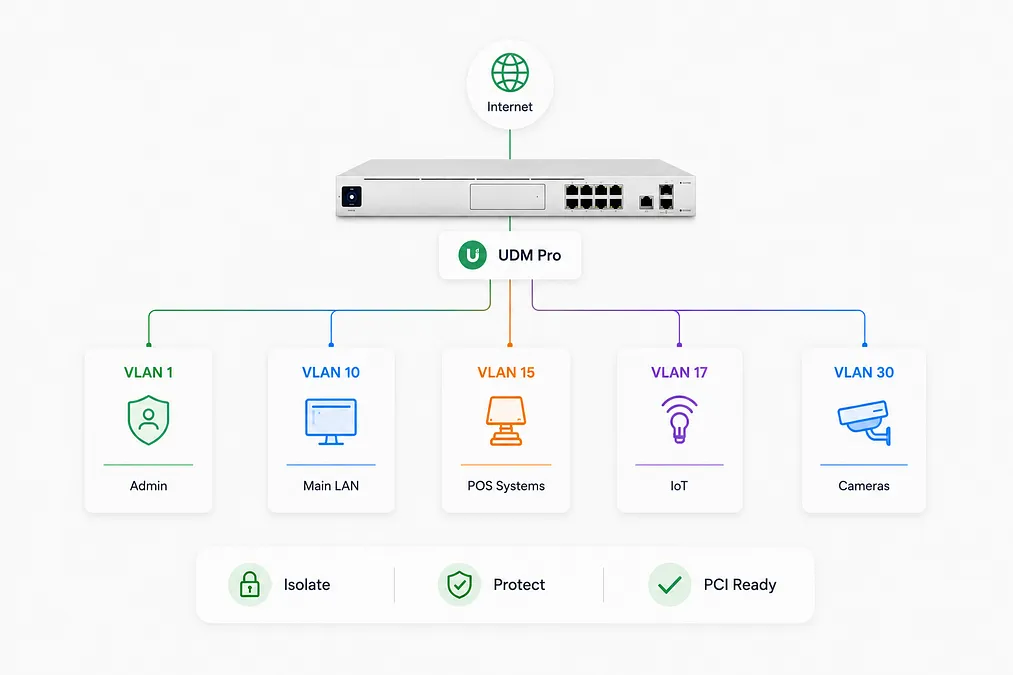
Most small restaurants and retail stores run their POS, guest Wi-Fi, security cameras, and staff devices on the same flat network. This fails PCI DSS requirements and exposes card data to unnecessary risk. The fix isn't expensive — it's architectural.
The 3-VLAN Structure
How to Segment Your Network the Right Way
VLAN 10 / POS
POS Network
Clover terminals, card readers, receipt printers. Isolated from everything else. Internet-only egress — no access to other VLANs. Firewall rules enforced at the switch level.
PCI ScopeVLAN 20 / Guest
Guest Wi-Fi
Customer-facing wireless. Completely separated from POS and internal staff network. Rate-limited. No inter-VLAN routing allowed.
IsolatedVLAN 30 / Cameras
Camera Network
UniFi Protect cameras and NVR. Separate from POS and guest. Local-only NVR access — cameras don't reach the internet unless cloud backup is explicitly configured.
Local OnlyPCI DSS Requirement 1: Network Segmentation
The Payment Card Industry Security Standards Council requires that cardholder data environments be segmented from other network traffic. A flat network — where POS and guest Wi-Fi share the same subnet — fails this requirement by design.
UniFi Implementation
What a PCI-Ready UniFi Config Looks Like
- Separate SSIDs per VLAN — One SSID for POS (WPA2-Enterprise recommended), one for guests, none for cameras.
- Inter-VLAN firewall rules — Block VLAN 20 and VLAN 30 from reaching VLAN 10. Applied in UDM Pro traffic rules.
- DNS filtering on guest VLAN — Prevents abuse of your connection. Also required by some PCI assessors.
- Switch port isolation — Wired POS terminals assigned to VLAN 10 profile at the switch port level, not just at the wireless layer.
- Regular config export — UniFi network config backup should be stored outside the device. Documented, versioned.
MKR Systems Approach
We configure UniFi networks with PCI segmentation built in from day one.
VLAN design, firewall rules, switch profiles, and wireless configuration are handled together. We document the network topology so you have a record for your PCI Self-Assessment Questionnaire (SAQ). No guesswork — structure first, compliance follows.
Get a PCI Network Review
We'll assess your current VLAN structure and identify gaps — free, no obligation.
→ Request Network Review ↓ Download UniFi PCI VLAN Checklist
A properly segmented network protects your customers and your business.
The cost of a PCI-compliant network is a fraction of the cost of a data breach fine. Structure it correctly once — and maintain it.
The cost of a PCI-compliant network is a fraction of the cost of a data breach fine. Structure it correctly once — and maintain it.
References & Data Sources
- [1]PCI Security Standards Council — PCI DSS v4.0 Requirements — Requirement 1 (Network Security Controls) and Requirement 11 (Security Testing). www.pcisecuritystandards.org/document_library/
- [2]Ubiquiti — UniFi Network VLAN Configuration Guide — Official guide for creating and managing VLANs on UniFi switches and wireless. help.ui.com/hc/en-us/articles/222183968
- [3]Clover / Fiserv — Network Requirements — Clover POS minimum network requirements including VLAN and firewall guidance. www.clover.com/en-US/help/network-requirements
MKR Systems, Inc. is an authorized Fiserv / Clover reseller and AT&T Business agent serving Los Angeles, Orange, Riverside, and San Diego counties. All analysis, recommendations, and cost models in this article are independently produced by MKR Systems based on publicly available data and our direct operational experience. Pricing and product specifications are current as of publication date and subject to change.
Is AT&T Fiber Available at Your Property?
Check fiber at your address and get a free network review — no pressure to buy.
Check Property AvailabilityRelated Articles
MKR Systems · Refer a Business
Refer a Business. Pick Your Reward.
1 referral · your choice · up to 3 per year
$249
Invoice Credit
Applied to your next MKR Internet bill
OR
$100
Visa Gift Card
Mailed after referral activates
✓
1 referral → $249 invoice credit on your MKR Internet bill — or a $100 Visa Gift Card
✓
Up to 3/year · $249/mo package · Internet + Network + Phones
✓
Reward issued after referred business completes first month of service